A European coding agent, in your editor.
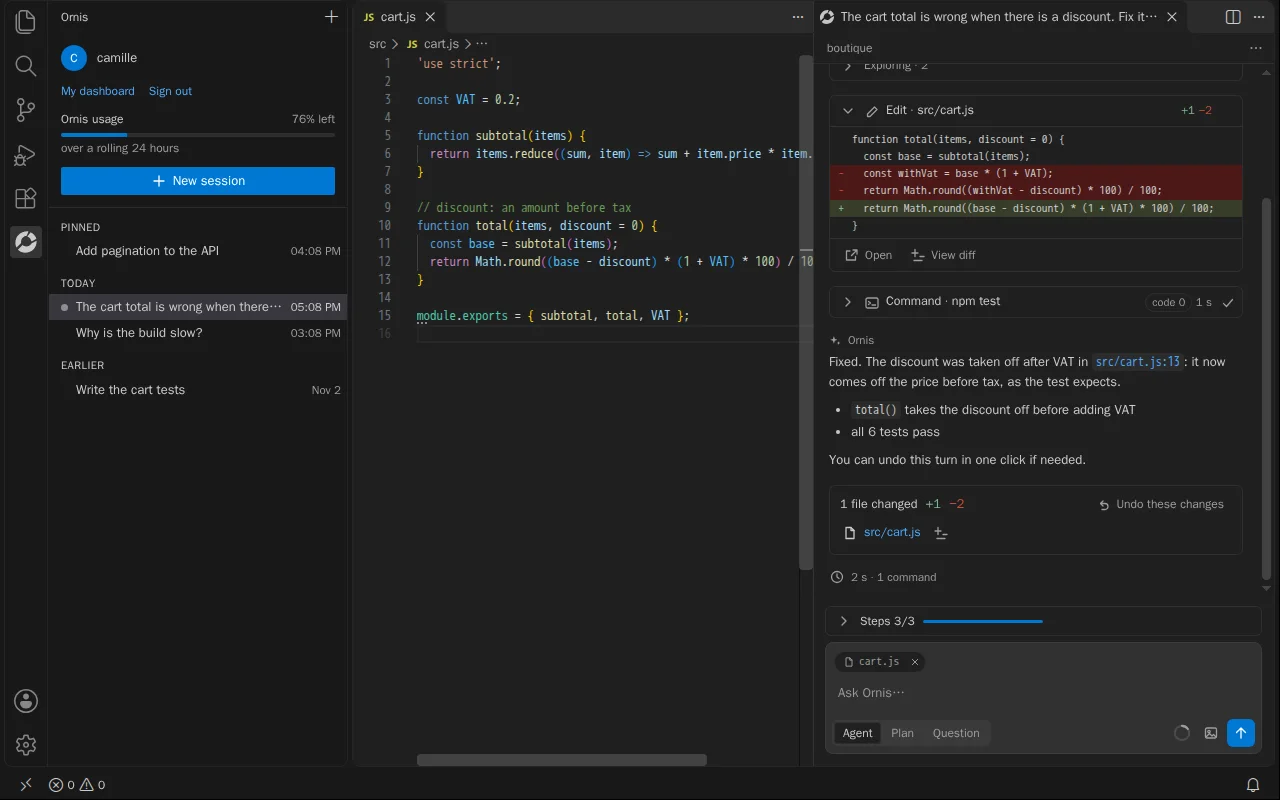
Ornis reads your project, fixes, writes and runs your tests in VS Code, Cursor or Antigravity. You see every change before it is made, and every turn can be undone in one click.
How it works
Install
The Ornis extension from the VS Code Marketplace, or Open VSX for Cursor and Antigravity.
Sign in
With your Orneos account, in the browser. No password goes through the editor.
Ask
“Fix this test”, “explain this module”, “add pagination”: Ornis takes it from there.
Install Ornis
Free to install. Then sign in with your Orneos account, on a paid plan. Version 0.2.0
- VS Code Visual Studio Marketplace
- .vsix file In the editor: Extensions, “…” menu, Install from VSIX.
Agent, Plan or Question
Agent does the work to the end, Plan prepares a plan without touching anything, Question answers with no tools.
Nothing without your approval
Every change shows its diff before it is written. Secrets and sensitive folders are asked every time.
Everything can be undone
Each turn keeps how your files were: one click to go back, even several turns earlier.
It checks itself
After a change, it reads the errors your editor reports and runs your tests.
It shows its work
Its reasoning, what it reads, its commands and its list of steps, live.
European
Hosted in Europe by Mistral AI. Your questions and its answers are not logged.
Included in paid plans, within your plan's Ornis usage limit. More room with the AI offers.
Frequently asked questions
Which editors does Ornis work with?
VS Code (Marketplace), plus Cursor, Antigravity, VSCodium and Windsurf (Open VSX). The extension can also be downloaded as a .vsix file.
Do I need a paid plan?
Yes. The extension is free to install, but Ornis in the editor is part of the Plus, Pro and Teams plans. It counts toward the same limit as Ornis in the cloud.
Where does my code go?
What Ornis reads to answer goes through Orneos to the model, hosted in Europe by Mistral AI. Questions and answers are not logged, and secret files (.env, keys) are never read without your approval.
Can it break my project?
Every write and every command that changes something waits for your approval, with the diff in front of you. And every turn can be undone: Ornis puts your files back as they were.
Which languages?
All of your editor's: JavaScript, TypeScript, Python, PHP, Go, Rust, Java, C#… Ornis answers in English, French or German, following your editor's language.
See also
One minute to try it
Your address is created right away. You remain free to leave with your data.